Choose your character before entering Norrath
Linux build 20260929-211500 restores the character picker and adds an explicit creation screen. You choose the details; the client no longer silently assigns your attributes and starting city.
Get the repaired Linux client
Download Linux client + assets
Extract into a new folder, open the extracted eq-client folder, and run:
./install-linux-deps.sh
./run-kartonath.sh
The installer handles Ubuntu’s libasound2t64 package. Login uses the included game address 205.134.198.196:5998, not the website’s proxied hostname.
Download this full package. The old executable-only auto-updater has not been advanced because it would leave older installations with an incompatible asset layout. Windows remains on its previous release.
SHA-256 checksum · Linux x86-64 · glibc 2.30+ · Vulkan graphicsWhat you can set
Log in → select Kartonath → New Character. Choose your name, race, class, gender, deity, starting city and classic face. Allocate all remaining points among the seven attributes, then click Create Character.
The picker appears after the server confirms creation. Select your character and click Enter World. Classic faces include their hair/beard appearance; these are not Luclin sliders.
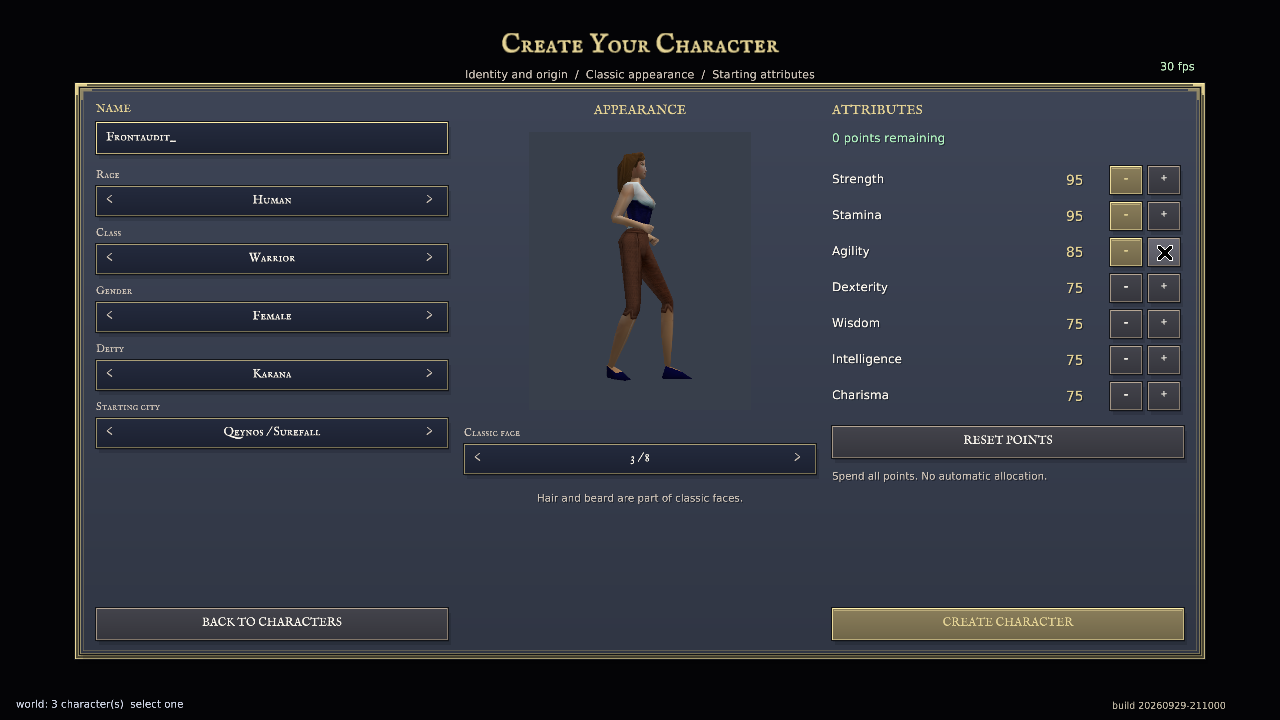
Verified, not assumed
A normal test-account character was created through these controls. The server saved Human / Warrior / Female / Karana / face 3 with STR 95, STA 95, AGI 85 and the other attributes 75, then allowed entry into South Qeynos.
The earlier client sent invalid starting attributes, received a rejection, and attempted to enter the nonexistent character. Creation now validates the allocation and keeps the form open on rejection.
External login and world-port traffic were observed on UDP 5998 and 9000 after repairing the active firewall. External zone entry and outage failover still need separate verification. This is a startup-flow repair, not a claim of complete Titanium/P99 parity; North Qeynos audit progress is unchanged.
Published September 29, 2026. Zone audit and remaining work